
Independent Audio Resource • XM Promo Services LLC
Hardware & Setup9 min read•September 08, 2026

What Hardware Is Needed for SiriusXM? How to Add Satellite Radio to Any Car or Truck

Didn't get satellite radio from the dealership? Here is the complete technician guide to SXV300V1 tuners, direct factory integration kits, FAKRA antenna adapters, and standalone dock & play receivers.

D
Dave Miller, Master Automotive Audio TechnicianVerified Technical Editorial Contributor
Independent Diagnostic
What Hardware Is Needed for SiriusXM? How to Add Satellite Radio to Any Car or Truck

Can You Add SiriusXM If Your Car Lacks It From the Factory?

One of the most common calls we receive at our audio installation desk goes something like this: "Dave, I just bought a pristine pre-owned truck. It has a beautiful touchscreen, backup camera, and heated seats, but when I press the source button, there is no satellite radio option. Can I add SiriusXM without replacing my entire dashboard?"

The answer is an absolute, unqualified yes. Regardless of whether you drive a 2005 commuter sedan, a 2022 Ford F-150 with a factory 12-inch touchscreen, a classic muscle car, an RV, or a boat, you can add genuine SiriusXM satellite radio.

Depending on your budget, your vehicle's existing dashboard setup, and how clean you want the installation to look, you have three primary SiriusXM hardware pathways. Here is how they work.


Pathway 1: The "SiriusXM-Ready" Aftermarket Stereo + SXV300 Tuner

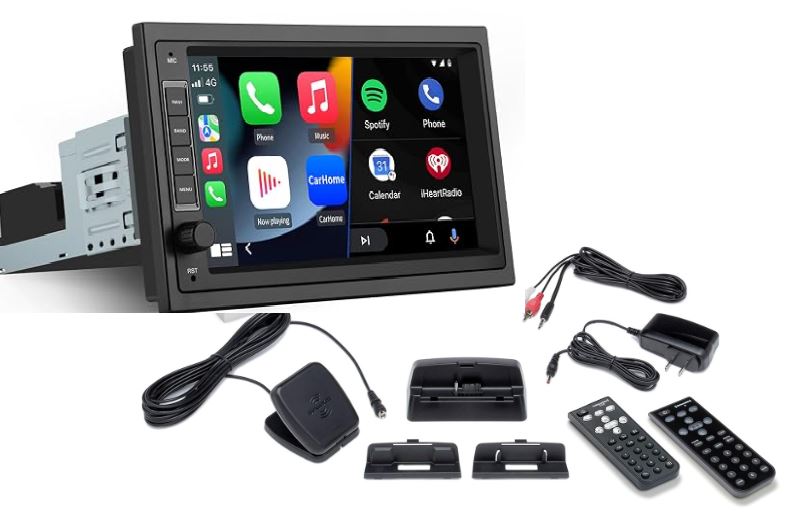
If you have already replaced your factory car radio—or are planning to upgrade to an aftermarket touchscreen from brands like Kenwood, Pioneer, Alpine, Sony, or JVC—this is the cleanest, most seamless SiriusXM solution available.

The Core Hardware: The SiriusXM SXV300V1 Connect Vehicle Tuner

  • Size: Roughly the dimensions of a deck of playing cards.
  • How It Connects: The SiriusXM SXV300 module features a single multi-pin proprietary harness that plugs directly into a dedicated port labeled "SiriusXM" on the back of any compatible SiriusXM-Ready head unit.
  • The User Experience: The SiriusXM tuner is completely hidden behind your dashboard trim. All SiriusXM controls—direct numeric channel entry, category browsing, album cover artwork, preset banks, and SiriusXM song tagging—are rendered natively on your aftermarket touchscreen.
  • Advanced SiriusXM Features Supported:
  • SiriusXM TuneStart™: Automatically begins songs from the very beginning when you switch between favorite preset channels.
  • SiriusXM SmartFavorites™: Buffers up to 10 SiriusXM channels simultaneously in RAM memory.
  • SiriusXM Traffic & Weather Now™: Access on-demand regional weather and road reports at the touch of a button.

  • Pathway 2: Direct-Fit OEM Factory SiriusXM Integration Kits

    What if you love your vehicle's factory dashboard, your heated seat controls, and your steering wheel buttons, and refuse to install an aftermarket screen?

    Specialty automotive electronics manufacturers (including VAIS Technology, PAC Audio, and iSimple) engineer direct-fit SiriusXM integration modules designed specifically for factory OEM head units across major automakers (Ford, General Motors, Toyota, Lexus, Honda, Jeep, Dodge, Nissan).

    How Factory SiriusXM Integration Hardware Works:

  • The Interface Module: A digital translation box taps into your vehicle's factory CAN-Bus or USB media input behind the dashboard.
  • The SiriusXM SXV300 Tuner: A SiriusXM SXV300 tuner plugs directly into the integration module.
  • The User Experience: Your factory screen suddenly displays a new audio source (labeled "SAT", "SiriusXM", or "USB Satellite"). You use your factory volume knobs, touchscreen presets, and steering wheel toggle buttons with zero visual change to your dashboard. Your factory warranty remains completely intact because all SiriusXM connections utilize factory-style plug-and-play wiring harnesses with zero wire splicing.

  • Pathway 3: Standalone SiriusXM Dock & Play Receivers (Maximum Versatility)

    If you are on a modest budget, drive an older vehicle without a digital screen, or want a single SiriusXM subscription that you can easily transfer between your daily commuter car, your weekend boat, your RV, and your home garage, a SiriusXM Dock & Play unit is the ideal solution.

    Leading SiriusXM Models:

  • SiriusXM Onyx Plus: Full-color display, SiriusXM album art support, 20 channel presets, and TuneStart.
  • SiriusXM Roady BT: The slimmest standalone SiriusXM receiver ever built, featuring direct wireless Bluetooth streaming to factory stereos and direct 3.5mm Aux connectivity.
  • Audio Output Methods for SiriusXM Receivers:

  • Direct 3.5mm Auxiliary Cable: Connects the SiriusXM dock's line-out jack directly into your car's 3.5mm AUX port. This provides the cleanest, static-free analog audio transfer.
  • Wireless Bluetooth (SiriusXM Roady BT): Pairs directly to your car stereo's factory Bluetooth audio profile without running an audio patch cord across your center console.
  • Direct FM Modulator (FM Direct Relay): Spliced directly into your vehicle's AM/FM antenna socket, broadcasting crystal-clear SiriusXM satellite audio over an unassigned FM frequency without outside radio interference.

  • Satellite Antenna Connectors Decoded: SMB vs. FAKRA for SiriusXM

    When setting up your SiriusXM hardware, understanding the antenna connection is critical:

  • SMB Connector (Gold Push-On): The standard miniature coaxial connection found on all aftermarket SiriusXM SXV300 tuners and dock cradles. It features a gold-plated center pin that pushes firmly onto the SiriusXM tuner port.
  • FAKRA Connector (Curry Code K Plastic Housing): The automotive standard used by factory car manufacturers. FAKRA connectors feature a color-coded, locking plastic collar (Curry Yellow, Code K, is reserved worldwide for SiriusXM and SDARS satellite radio).
  • Installer Pro Tip: If your car already has a factory "shark-fin" roof antenna from a previous trim level or GPS navigation package, you often do not need to stick an aftermarket magnetic antenna on your roof. You can install an inexpensive FAKRA-to-SMB antenna adapter cable (~$12) behind the dash, allowing your new SiriusXM SXV300 tuner to utilize your vehicle's sleek factory SiriusXM roof antenna!

    SiriusXM Hardware Comparison Summary Table

    Hardware OptionBest Suited ForDashboard AppearanceSteering Wheel RetentionInstallation Difficulty
    SiriusXM SXV300 + Aftermarket RadioUpgrading older cars with Apple CarPlay/Android AutoCompletely modern aftermarket screenRetained via steering control interface (Maestro/SWI)Moderate (Requires dashboard trim removal)
    OEM Factory SiriusXM Integration KitModern factory screens lacking satellite option100% Factory OEM Look (Zero aftermarket clutter)Fully retained natively via CAN-BusModerate (Plug-and-play harness behind factory radio)
    SiriusXM Dock & Play (Onyx Plus / Roady BT)Budget upgrades, classic cars, RVs, multi-vehicle useSmall external display mounted on vent or dashControlled via unit faceplate buttons or remoteEasy (DIY 15-minute setup via 12V cigarette socket)

    Activating Your Hardware: Finding Your SiriusXM Radio ID

    Once your SiriusXM hardware is physically wired into your dashboard, the final step is activation:

  • Turn your stereo to the SiriusXM band.
  • Tune down to Channel 0. Your display will reveal your unique 8-character alphanumeric SiriusXM Radio ID (also called the ESN).
  • Tune to SiriusXM Channel 1 (the preview channel) to verify antenna reception.
  • Send an over-the-air activation signal to begin enjoying your full SiriusXM subscription lineup.

  • Need Help Choosing the Right SiriusXM Hardware for Your Vehicle?

    Every automotive platform—from domestic pickup trucks to European optical fiber networks—has unique wiring and antenna configurations. If you are unsure which SiriusXM tuner module or antenna adapter matches your vehicle's year, make, and trim level, talk directly with an independent audio specialist at 1-855-666-6137.

    Related Topics:SiriusXM HardwareSXV300Tuner KitsAftermarket Car AudioCar Stereos
    Technical & Diagnostic Desk

    Looking for a specific solution? Our Experts can point you in the right direction.

    Need an exact FAKRA antenna pinout, marine chartplotter radar integration, avionics SoftMute wiring, or help troubleshooting an persistent "Acquiring Signal" fault? Our technical desk is ready to help.
    Speak to a Specialist: 1-855-666-6137
    Certified Audio TechniciansZero-Pressure Honest Fitment AdviceToll-Free USA Assistance • Mon–Fri 8am–8pm EST
    Related Technical Guides

    More in This Category

    View All Articles